


You open Google Search Console expecting to find queries related to your website, but instead discover unfamiliar searches for casino brands, betting sites, “togel,” slots, or strange domain names.
For a technology, business, AI, or otherwise unrelated website, this can be alarming.
Does it mean your website has been hacked?
Not necessarily.
An unusual query appearing in Google Search Console is not, by itself, proof of a security breach. Google may occasionally associate a page with unexpected searches, and some impressions can simply be irrelevant search noise.
However, a large cluster of unrelated gambling queries — particularly when they appear suddenly or are associated with unknown URLs on your domain — deserves investigation.
In one keyword dataset we analyzed, terms such as Dorahoki, Dewatogel, Direkturtoto, Permata4D, Anekatoto, and Shiokambing3 showed substantial search activity in Indonesia. Some had surprisingly low keyword difficulty.
Those numbers might look like SEO opportunities at first glance. They are not necessarily opportunities at all.
For a non-gambling website, the more important question is:
Why is Google associating my website with these searches?
This guide explains how to investigate that question, distinguish harmless search noise from potential SEO spam, and determine whether unauthorized pages or content may have been injected into your website.
Google Search Console’s Performance report shows search queries for which pages from your property received impressions or clicks in Google Search.
Normally, these searches should broadly correspond to your website’s content.
A cybersecurity website might receive searches about malware.
A smartphone website might receive searches about Android devices.
An AI website might appear for searches about ChatGPT, AI models, or automation tools.
But suppose that same technology website suddenly starts receiving impressions for searches such as:
That mismatch deserves attention.
The important distinction is that the query itself is not evidence of a hack.
You need to identify the page that Google associates with the query.
There are several possible explanations, ranging from harmless to serious.
Search engines sometimes test pages against queries that are not perfectly aligned with their content.
A few isolated impressions for an unrelated search query can therefore occur without anything being wrong with your website.
For example, if a strange query generated two impressions over several months and points to a completely legitimate article, that is very different from discovering hundreds of gambling queries associated with unknown pages.
This is why query volume alone should never determine whether you have a security incident.
Names, abbreviations and short keywords can have multiple meanings.
A term may represent:
A legitimate article can therefore occasionally appear for an unexpected interpretation.
This is particularly important with short or ambiguous keywords.
Before declaring a query malicious, examine its actual search intent and the page Google is ranking.
This is considerably more serious.
An attacker who gains access to a vulnerable website may create unauthorized pages specifically designed to rank for lucrative searches.
Google describes unauthorized pages added through security vulnerabilities as a form of hacked content.
These pages may target:
The normal website can continue to appear perfectly legitimate to its owner while Google discovers thousands of malicious URLs.
Attackers do not always create obvious new pages.
They can modify existing pages by injecting:
A page that still looks normal in a browser may therefore contain unwanted elements in its source or rendered output.
More sophisticated spam can display different content depending on who visits the page.
A normal visitor may see the original website.
Googlebot or visitors arriving through search engines may receive gambling content or a redirect.
This technique makes the compromise harder for the website owner to notice.
It also explains why simply opening the homepage and saying “everything looks normal” is not a sufficient security check.

If you see a suspicious gambling query in Google Search Console, do not begin by searching your WordPress dashboard.
Start with Search Console.
Open:
Performance → Search results → Queries
Select the suspicious query.
Then open:
Pages
You now want to answer one question:
Which URL on my domain is receiving impressions for this query?
This dramatically changes the investigation.
Suppose an unfamiliar gambling query points to one of your legitimate technology articles.
Open the article and inspect it.
If the content is legitimate, its source is clean, there are no suspicious links, and the query generated only occasional impressions, the event may simply be an irrelevant Google association.
Record it and monitor the situation.
Do not delete a good article simply because it received a strange impression.
This is much more concerning.
Imagine finding URLs such as:
example.com/togel-login/
example.com/slot-gacor/
example.com/casino/brand-name/
when you never created those pages.
That is a strong reason to investigate immediately.
Do not assume that deleting the visible URL solves the problem. If an attacker created it, you need to determine how the page was created.
Finding one suspicious URL is bad enough.
Finding dozens, hundreds, or thousands of similarly structured pages can indicate automated spam-page generation.
Look for recurring patterns in:
Patterns can reveal whether the URLs originate from WordPress posts, compromised plugins, database injection, generated files, or another mechanism.
Once you identify a suspicious URL, inspect it using Google’s URL Inspection tool.
Google’s tool can show information about the version of a URL known to Google, including its indexing status, discovery information, crawl information, canonical URL and other details.
Pay particular attention to:
Determine whether Google actually indexed the suspicious URL.
An impression-producing page may already be indexed, but an unknown URL discovered during a broader investigation may not be.
Check when Google last crawled the URL.
This can help build a timeline for the incident.
Search Console may show a page Google potentially used to discover the suspicious URL.
An unexpected referring page can provide an important clue.
For example, if a legitimate article links to an injected gambling page, that legitimate page itself may have been modified.
Check whether Google associates the URL with one of your submitted sitemaps.
A spam URL unexpectedly appearing in a sitemap deserves further investigation of both the sitemap generator and the underlying content database.
Look at both the user-declared canonical and Google’s selected canonical.
Unexpected canonical behavior can expose duplicate spam pages or manipulative configurations.
Where available, examine what Google actually retrieved.
This is particularly valuable when your current browser view does not match what appears to have been indexed.
The indexed version and current live page can differ because the website may have changed since Google’s last crawl.
Do not limit the investigation to URLs you already know.
Open Search Console’s Page indexing report and look for unexpected changes in the number of URLs Google knows about.
A website that normally contains 300 indexable pages but suddenly exposes thousands of new URLs deserves investigation.
However, page-count changes alone are not proof of compromise.
WordPress archives, parameters, filters, feeds, pagination and legitimate site changes can also increase URL counts.
Focus on unexpected patterns.
For example:
/casino/
/slot/
/togel/
/bet/
/login/
/4d/
or large groups of meaningless alphanumeric URLs.
Also compare submitted and unsubmitted URLs.
A suspicious URL does not have to appear in your sitemap for Google to discover it. Google can find URLs through links and other discovery mechanisms.
Your sitemap should primarily contain URLs you intentionally want search engines to discover.
Open the sitemap directly and search for:
If gambling URLs are present, determine where your CMS obtained them.
On WordPress, a sitemap entry often corresponds to an underlying post, page, taxonomy or another registered content type.
The sitemap is therefore a useful clue, but it is not the root cause.
Deleting the sitemap entry without removing the malicious content or access mechanism does not fix a compromised website.
Perform targeted searches for terms associated with the suspicious queries.
For example:
site:example.com togel
site:example.com casino
site:example.com slot
site:example.com "suspicious brand"
This can expose indexed pages that are difficult to find through normal navigation.
Do not rely exclusively on site: searches, however. They are useful investigative clues, not a complete inventory of Google’s index.
Search Console remains the better source for inspecting URLs within a property you control.
If the site uses WordPress, investigate beyond visible posts and pages.

Look for administrator accounts you do not recognize.
An unauthorized administrator can recreate malicious content after you delete it.
Identify:
Remove software you do not need and update legitimate components from trusted sources.
Search the database-backed content for suspicious keywords.
Do not only inspect published posts.
Check:
Spam can be inserted directly into the WordPress database.
Important areas can include:
Database work should be performed carefully and preferably after creating a known-good backup.
Look for unexpected PHP, JavaScript and executable files, especially in locations where they do not belong.
Pay attention to:
Comparing WordPress core files against official versions can help identify unauthorized modifications.
SEO spam does not always present itself as visible spam content.
A compromised page may redirect only:
Test suspicious URLs under different conditions.
Also examine server-side redirect rules, including .htaccess where applicable, web-server configuration, WordPress redirect plugins and injected JavaScript.
A redirect that you cannot reproduce immediately should not automatically be dismissed.
Search Console can report security problems detected by Google, but a clean security report should not be interpreted as absolute proof that every file, database entry and page on the website is safe.
Similarly, Google’s URL Inspection live test does not test every possible security or quality condition.
Treat Search Console as one layer of evidence.
A complete investigation may require:
Search spam follows economic incentives.
Competitive industries can create incentives for attackers or spammers to exploit established domains rather than build authority from scratch.
If attackers compromise an existing website, they may attempt to use its domain history, backlinks or crawl activity to expose spam pages to search engines.
Google’s spam policies explicitly discuss hacked content, including code injection and page injection.
This is why casino-related pages appearing on a completely unrelated domain should not automatically be treated as a new content opportunity.
A keyword may have millions of searches and low apparent keyword difficulty while still being completely inappropriate for your website.
SEO relevance matters more than raw search volume.
Consider a hypothetical technology website that begins receiving impressions for:
Keyword tools may report substantial Indonesian search volumes for several of these terms.
From a conventional keyword-research perspective, the numbers can look attractive.
But examining the search ecosystem shows that these terms are associated with gambling/togel brands or related searches.
For a technology website, the correct SEO reaction is therefore not:
“Let’s publish six articles targeting these brands.”
The correct question is:
“Why is a technology website receiving visibility for a cluster of unrelated gambling searches?”
That distinction prevents a common SEO mistake: confusing visibility with opportunity.
A practical way to assess the situation is to use three levels.
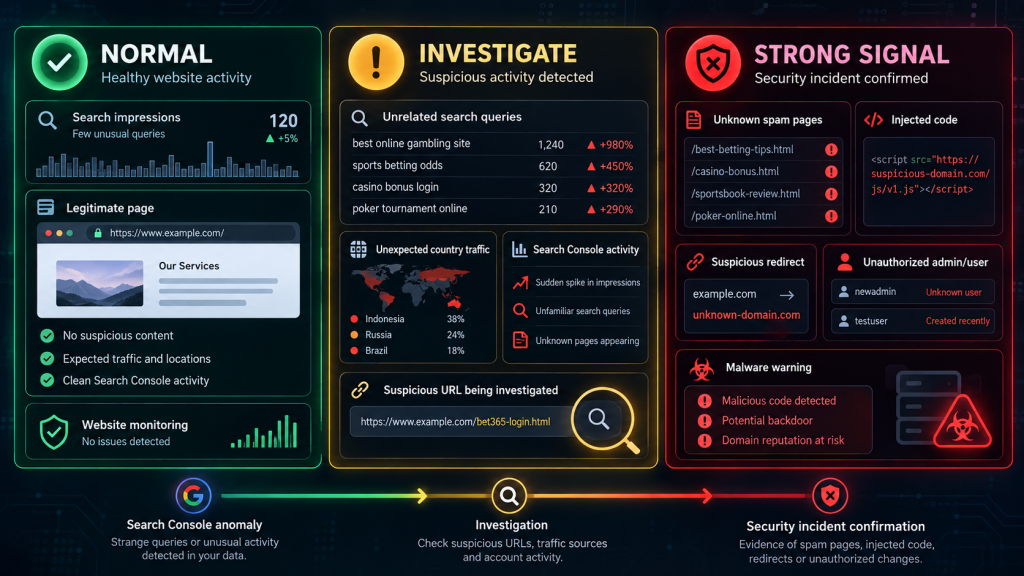
Examples:
Action:
Monitor it.
Examples:
Action:
Investigate Search Console, URLs, sitemap, CMS and server.
Examples:
Action:
Treat the website as potentially compromised and begin incident response rather than merely performing SEO optimization.
If unauthorized content is confirmed, focus on removing the cause, not only the symptoms.

Before making extensive changes, record:
This information can help determine how the compromise happened.
Back up the current environment before destructive remediation, while remembering that the backup may itself contain malicious content.
Possible causes include compromised credentials, vulnerable software, malicious plugins, insecure hosting accounts or other unauthorized access.
Do not assume the first malicious file you find is the original entry point.
Remove malicious pages, files, redirects, users and injected database content after determining what is legitimate.
Update or replace vulnerable software and remove unnecessary components.
When compromise is confirmed or credentials may have been exposed, review and rotate relevant credentials such as CMS, hosting, FTP/SFTP, SSH and database credentials as appropriate.
Scan the filesystem and database again.
Confirm that malicious content does not reappear.
After the site is clean, use URL Inspection and appropriate Search Console reports to verify Google’s view of affected pages.
For legitimate corrected URLs, you can request recrawling when appropriate.
Removed malicious URLs should return the appropriate HTTP status rather than being redirected indiscriminately to the homepage.
Prevention requires both security and SEO monitoring.
Keep WordPress core, themes and plugins updated.
Use strong, unique credentials and multi-factor authentication where available.
Remove abandoned plugins and themes.
Avoid unofficial or modified “nulled” software.
Restrict administrative access.
Monitor unexpected file changes.
Review administrator accounts periodically.
Maintain backups that are separate from the production environment.
Monitor Search Console queries and indexed pages.
Watch for sudden growth in URLs.
Review server logs when suspicious activity occurs.
Security monitoring and SEO monitoring should complement each other.
A compromise designed for search engines may first become visible as an SEO anomaly rather than as an obvious website failure.
Google associated one or more pages from your property with those searches. This can result from harmless query matching, ambiguous terminology, legitimate content, or unauthorized spam content. Determine which URL generated the impression before drawing conclusions.
No. A query alone does not prove compromise. Multiple unrelated gambling queries combined with unknown URLs, injected content, unauthorized users or suspicious files provide much stronger evidence.
Open the Search results Performance report, select the query, and examine the Pages dimension. This identifies the URLs receiving impressions or clicks for that filtered query.
It is search-oriented spam involving gambling-related content, pages or links. When such content is placed on a website without its owner’s permission, it can fall under hacked-content scenarios such as page or code injection.
Yes. A URL does not need to appear in the main navigation to be discoverable by search engines. Injected pages can be discovered through links, sitemaps or other crawling paths.
A compromised established domain may already have backlinks, crawl history and search visibility. Attackers can attempt to exploit those existing signals for spam rather than building a new domain from zero.
Not simply because they generate impressions or have high search volume. First determine whether they are relevant to your audience and website. For a technology or cybersecurity site, discussing the security phenomenon itself can be relevant; creating promotional pages for unrelated gambling brands is not.
Queries themselves cannot simply be “deleted” from Search Console. Investigate the pages associated with them. If your site is clean and the query is merely irrelevant search noise, there may be nothing to remove.
Unexpected gambling keywords in Google Search Console should be treated as signals to investigate, not automatic proof of compromise and not automatic keyword opportunities.